
Most people know about Excel’s undo and redo feature by one of the following methods.
- The Ctrl + Z (for undo) and Ctrl + Y (for redo) keyboard shortcuts.
- The undo and redo buttons in the Quick Access Toolbar.
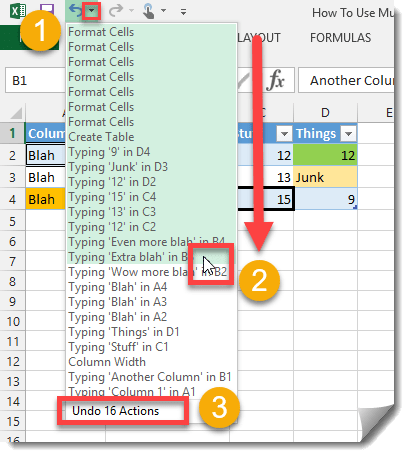
But did you know about Excel’s feature to undo and redo multiple actions at one time?
- Press the small down arrow to the right of the undo button in the Quick Access Toolbar.
- Move your cursor down the list of previous actions until you’ve highlighted all the actions you want to undo then left click to perform the undo.
- At the bottom of the drop down the number of highlighted actions (those you are going to undo) will be displayed.
The same thing can be done with redoing actions.



 👉 Find out more about our Advanced Formulas course!



my drop down box only has the most recent action listed
What version of Excel?